Juniper Mx Series: Introduction and Features

Juniper Networks released its first router, M40, in year 1998. The M40 was able to outperform any other router architecture. The M40 was also the first router to have a true separation of the control and data planes.
The model name M40 was given for its ability to process 40 million packets per second (Mpps). The “M” refers to the multiple services available on the router, such as MPLS (Multi Protocol Label Switching) with a wide variety of VPNs. The primary purpose for the M Series was to allow Service Providers to deliver services based on IP while at the same time supporting legacy frame relay and ATM networks.
Due to increase in the number of customers, the task of Service Providers to support them has also increased exponentially. Frame relay and ATM have been decimated, as customers are demanding high-speed Layer 2 and Layer 3 Ethernet-based services.
Nearly all networking equipment connects via Ethernet. Companies have challenging requirements to reduce operating costs and at the same time provide more services. Ethernet enables the simplification in network operations, administration, and maintenance. The MX Series was introduced in 2007 to solve these new challenges. It is optimized for delivering high-density and high-speed Layer 2 and Layer 3 Ethernet services. The “M” still refers to the multiple services heritage, while the “X” refers to the new switching capability and focus on 10G interfaces and beyond.
It’s no easy task to create a platform that’s able to solve these new challenges. The MX Series has a strong pedigree: although mechanically different, it leverages technology from both the M and T Series for chassis management, switching fabric, and the routing engine.
Features that you have come to know and love on the M and T Series are certainly present on the MX Series as it runs on the same image of Junos. In addition to the “oldies, but goodies,” is an entire featureset focused on Service Provider switching and broadband network gateway (BNG). Here’s just a sample of what is available on the MX:
High availability
Non-Stop Routing (NSR), Non-Stop Bridging (NSB), Graceful Routing Engine Switch over (GRES), Graceful Restart (GR), and In-Service Software Upgrade (ISSU)
Routing
RIP, OSPF, IS-IS, BGP, and Multicast
Switching
Full suite of Spanning Tree Protocols (STP), Service Provider VLAN tag manipulation, QinQ, and the ability to scale beyond 4,094 bridge domains by leveraging virtual switches
Inline services
Network Address Translation (NAT), IP Flow Information Export (IPFIX), Tunnel Services, and Port Mirroring
MPLS
L3VPN, L2VPNs, and VPLS
Broadband services
PPPoX, DHCP, Hierarchical QoS, and IP address tracking
Virtualization
Multi-Chassis Link Aggregation, Virtual Chassis, Logical Systems, Virtual Switches
With such a large featureset, the use case of the MX Series is very broad. It’s common to see it in the core of a Service Provider network, providing BNG, or in the Enterprise providing edge routing or core switching.
You Might Like to Read 

What is the Function of a Router  

Linux Networking Commands 

ATM Networks Explained  

A Brief look at Hubs and Switches

Hubs and Switches: A brief look


Both hubs and switches are important exchange points at the logical centre of an Ethernet network. Each computer or other network node connects to a hub or switch through a cable plugged into a port. In a small network, a hub or switch is almost always a tabletop box with indicator lights on the front and Ethernet ports on the back. In a larger network, the hub or switch might be a panel that mounts in an equipment rack.


The maximum data transfer speed of a network is the data-handling speed of the hub or switch.  Today, the most common hubs and switches are designed for both 10Mbps and 100 Mbps operation. The latest generation of switches and hubs supports even faster Gigabit Ethernet (1000 Mbps) switches but only at slightly higher prices than those of older 100 Mbps versions.


Hub


A hub is a broadcast domain and when a data packet enters a hub, the hub relays that packet to all of the hub’s ports. Each node compares the address on the packet with its own address and either accepts it if the address is the same or ignores it if the packet is addressed to some other node. Because the hub sends each packet to every port, only one packet can travel through the network at a time. If two or more computers try to send packets at exactly the same time, Ethernet’s collision detection feature forces them to stop, wait, and try again a fraction of a second later. Also the hub adopts the shared bandwidth working mode.


In order to prevent collisions, each node must examine the network to be certain that no other node is already using the hub before it transmits a packet. Therefore, a network with a 10/100 hub is no faster than the slowest node. If all the computers in your network use 100 Mbps network adapters but the printer connects through a 10 Mbps port, the whole network will run at only 10 Mbps or less. 


As more nodes try to use a hub at the same time, the data transfer speed  through the entire network drops. This could have a significant effect on a busy network that uses a hub: The actual data transfer could be only a fraction of the nominal 10 Mbps or 100 Mbps. In general, hubs are slow, simple, and cheap.


Switch


The switch is a device of data link layer, forwards and floods data frames based on the MAC address. It connects the nodes of a network to one another but rather than sending every packet to every port, a switch reads the MAC address of each incoming packet and sets up a direct connection from the source of each packet to its destination. In the meantime, if some other node tries to send a data packet to another unused port, the switch can set up the link without breaking the other connection. 

A switch can handle more than one connection at the same time. Because a network node connected to a switch doesn't have to monitor the entire network for possible collisions, it can send and receive data at the same time. 


Networks in larger business offices usually run cables from each computer back to a central space where all the switching equipment is mounted on a wall plate or an equipment rack. This is often the same room where in-house telephone equipment connects to the telephone company’s outside lines. This space is often called a wiring closet.


Switches increases the number of collisions domains in the network. Switches that are configured with VLANs will reduce the size of the collision domains by increasing the number of collision domains in a network, but making them smaller than that of one big, flat network.

Enjoy!!!.

You Might like to Read:

What is the Function of a Router 
Linux Networking Commands 
ATM Networks Explained

What is the Function of a Router


A Router is one of the most happening and intelligent Device in Computer Networking. Basically, its a device that forwards data packets between computer networks.

The perform different functions like:
           1.  Packet Switching.
        2.  Path Selection.

 It is the routers job to determine the best method for delivering the data, and switching that data as quickly as possible.

Intercept datagrams sent to remote network segments between networks, playing a translated role. 

Router Selects the most reasonable route to guide communications. In order to achieve this function, the router will check the routing table based on certain routing communication protocol, and the routing table lists all the nodes contained in the entire internet, the path conditions between nodes
and transmission costs associated with them. 


As you can see in the below diagram, a specific node (a) has more than one path to reach its destination (g) , then, the function of router is to select the optimal path based on pre-determined specifications (Now there are many conditions and algorithms defined which help router to select the most optimal path, but we are not diving into that complexity)


Because a variety of network segments and their mutual connection situations may change, the routing information needs to be updated in time(in Router Table), which be done as :


 1. Time based Update ( Update table after Certain Time )
 2. Updating according to changes determined by the routing information 
     protocol used. Each router in the network dynamically updates its routing
     table according to this rule to maintain effective routing information.


While forwarding datagram, Router facilitate transferring datagrams between networks by dividing large data packets into appropriate sized data packets according to predetermined specifications, and those appropriate sized data packets will be turned into their original form when reaching the destination.

Multi-protocol routers can connect and use network segments of different communication protocols and so they can act as connecting platforms for network segments of different communication protocols.

Finally, main function of router is to guide the communications to the destination network, and then reach the addresses of the specific node station. 

Another function is to decompose the internet address. For example, assign parts of the network address to specific network, subnet and a group of regional nodes, while the rest can be used to specify the particular station of subnet. Hierarchical addressing allows routers to store addressing information of networks with many node stations.

You Might Like to Read:

Linux Networking Commands 

ATM Networks Explained

Linux Networking Commands

While working on Operating System like Linux, you should not waste your time by going into GUI and setting or configuring your Network system. Linux is fun only when the power of its commands is realized and believe me, once you get addicted to the commands, you’ll never think of switching to GUI. We’ll see the some of the network commands you can use to set up your networking system properly:


1. arp
Description:
ARP stands for Address Resolution Protocol, which is used to find the MAC address(your device physical address) of a network neighbour for a given IPv4 Address.

Practical Use:
Let’s assume you have a big office and different devices like Printer, IP Phones, Fax Machines etc.. are connected to network. Now each device has a unique hardware address like this 00:03:23:64:B6:32 called MAC Address or Ethernet Address.To connect this device with an IP address so that it can be access from remote we can add an entry using ARP like:
                  arp -s 190.3.2.134 00:03:23:64:B6:32
and after that, run the command
                                    PING 190.3.2.134
Ping Command is used to set the IP address for the hardware. PING command finally assigns the IP address.And we are done. The device is added to the ARP table and has the IP address now. You can access it now in your network.

Problems you might face:
1. You need to have administrator role to run this.
2. IP address might already be in use.
3. Wrong IP address or MAC address are given in command. PING command will confirm it.
4. PING function is not enabled.
5. The network is using DHCP, BOOTP or RARP and network will automatically assign the ip address.


2. dig
Description:
dig (domain information groper) is a tool for interrogating DNS name servers. It performs DNS lookups and displays the answers that are returned from the name server(s) that were queried. DNS administrators use dig to troubleshoot DNS problems. dig command has some sections in the Output it gives, but its main Section is the Answer Section which you should be looking for. For e.g. to display the output with only the answer section you need to type same as shown in the screenshot:
In above screenshot +noall means we don't want any section to be displayed, but since we want the answer section to be displayed, we add +answer. One more advantage of this command is that it can be also used for doing reverse lookups i.e. you give the address in the command and it will give the corresponding name and it can be typed as :
                                     dig –x
There is one more good option call short for viewing just the ip-address of a web site (i.e the A record), use the short form option as shown below in Screenshot:


3. domainname
The domainname command displays or sets the name of the current NIS domain. If you do not specify a parameter, the domainname command displays the name of the current NIS domain. A domain typically encompasses a group of hosts under the same administration. Only the root user can set the name of the domain by giving the domainname command an argument. To enter a new domain name, type:
                            domainname david
The command sets the NIS domain name to david.
To find out the name of the domain your machine belongs to, you just have to type:
                               domainname


4. ethtool
Its a query to control network driver and hardware settings and also used for displaying or modifying the Network Interface Controller (NIC) parameters.

The command is useful for:
§ Identification and diagnostic of Ethernet devices
§ Extended Ethernet devices statistics
§ Control speed, auto-negotiation and flow control for Ethernet devices
§ Control checksum offload and other hardware offload features
§ Control DMA ring sizes and interrupt moderation
§ Control receive queue selection for multiqueue devices
§ Upgrade firmware in flash memory
It is run as shown in the Screenshot:
You can type the Ethernet interface name as there in your case. By default its eth0 and if you have multiple Ethernet interface you can type as eth1 ,eth2 etc.. To know the version of the Ethernet driver you need to type as shown in screenshot below:
You can also use ethtool with -S option to display the bytes transferred, received, errors, etc, as shown below.
                                  ethtool –S etho


5. finger
In Unix, finger is a program you can use to find information about computer users. It usually lists the login name, the full name, and possibly other details about the user you are fingering. These details may include the office location and phone number(if known), login time, idle time, time mail was last read, and the user's plan and project files. Finger may be used to look up users on a remote machine. Format is
                             "user@host"or "@host"

ATM Network Explained

1.  Asynchronous transfer mode (ATM) is a network switching technology.

2. It uses a technique called cell switching, breaking all data into packets and transmits them 
     from one location on the network to another.

3.  It’s a networking model in which packets are of equal size can be constructed. Equal-sized packets, or cells, bring a tremendous amount of simplicity in the networking hardware, since buffering, multiplexing, and switching of cells become extremely simple. Its packet size is 53-byte. Each cell has a 48-byte data payload and a 5-byte header.   The header identifies the virtual channel to which the cell belongs.

4.   ATM works at layer 2 of the OSI model and typically uses SONET (OC-3, OC-12, etc.) for framing and error correction out over the wire. ATM switches convert cells to SONET frames and frames to cells at the port interface.

5.  ATM typically supports sources as FAX, coded video, and bulk data.

6.  It’s a set of connection-oriented protocols, which means that a connection must be pre established between two systems in a network before any data can be transmitted.

7.  ATM is bandwidth-on-demand networking and is scalable in bandwidth with the ability to 
     support real multimedia applications.

8.  ATM supports QoS mainly to reserve resources that guarantee specified maximum delay,minimum throughput, and maximum data loss. The QoS support allows ATM to concurrently handle all kinds of traffic.

9.  The typically high overall ratio of header to data. This issue normally arises when the message size is large and the standard size of packets is small.


10.


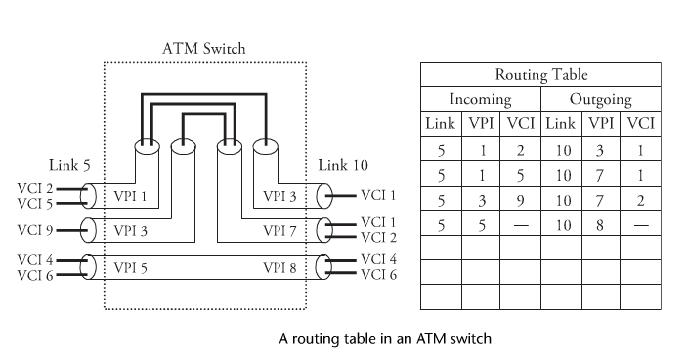
11. ATM connections are identified by a virtual channel identifier (VCI) and a  virtual path Identifier (VPI).  VCI and VPI are combined to be used in a switch to route a cell. As shown in Figure, the identity of a “physical” link is identified by two “logical” links: virtual channel (VC) and virtual path (VP). When a connection is setup, the values of these identifiers remain unchanged for the life time of the ATM connection.


12. Below figure shows a routing table in an ATM switch, with routing  
     information for all active connections passing through the switch. The 
     routing information consists of the new VPI/VCI and new outgoing link for
     every incoming VC. Link5, with VPIs 1, 3, and 5, can be switched on link 
     10 with VPIs 3, 7, and 8 through the ATM switch. A routing table provides 
     the detail of the switching function. For example, a cell with VPI 3 and VCI
     9 on link 5 is set to be forwarded with VPI7 and VCI2 on link 10.


13. The ATM protocol structure in OSI model consist as a tightly linked layer consist of the physical layer, the ATM layer, the ATM adaptation layer (AAL), and higher layers. The physical layer includes two sublayers: the physical medium and transmission convergence. The physical medium     sublayer defines the physical and electrical/optical interfaces with the      transmission media on both the transmitter and the receiver.

14. The layer also provides timing information and lin ecoding. The    
     transmission convergence sub layer provides frame adaptation and frame
     generation/recovery.

15.  The ATM layer provides services, including cell multiplexing and 
     demultiplexing, generic flow control, header cell check generation and
     extraction, and remapping of VPIs and VCIs. The AAL layer maps higher- 
     layer service data units, which are fragmented into fixed-size cells to be  
     delivered over the ATM interface.This layer collects and reassembles ATM 
     cells into service data units for transporting to higher layers.

More to come about other technologies.. Keep Watching

Network Carriers Explained


We use phones and computers everyday and so we might be curious that how the data is travelling so fast in fractions of Seconds. To carry that data we need carriers, like we have trains or buses to carry our goods. So there are different standardized carriers who have the different capacity i.e. at which rate the data will be transmitted, so depending upon your price range we can buy the type of carrier. The carriers can be used to transmit both voice and data

Different Type of Carrier Signals:

T1
1)  T1 is a digital carrier signal that transmits the signal at a data rate of about 1.544  
       megabits/second.
2)  It contains twenty four digital channels.
3)  This technology makes your modem to have higher speeds and it is an affordable 
       technology.  
4)  Basic Unit of T-Carrier System is DS0(Digital Signal Level 0) having transmission Rate 
       as 64 k bit/s.
5)  The T-1 channel combines 24x64 Kbps(1536 kbps) channels into one single channel
6)  The rest 8 k bit/s are used for framing information (1536+8 = 1544kbps).
7)  T2 and T3 circuit channels carry multiple T1 channels multiplexed, resulting in  
       transmission rates of 6.312 and 44.736 M bit/s, respectively.
8)  The DS designations are used in connection with the North American(T) hierarchy only. 
       So DS1 is the data carried on a T1 circuit so the terms are used interchangeably.

E.g.
                                         In Above Diagram T1C ("C" stands for "concatenated")

E1
1)  E1 is similar to the T1.
2)  T1 is the North American term whereas the E1 is the European term for the transmission      3)  E1 is a physical layer protocol, like Ethernet. It defines a 2Mbps link between two 
      endpoints.
4)  It has 32 channels at the speed of 64 Kbps.
5)  2 channels among the 32 are reserved for signaling while the other channel is used for 
      controlling.
6)  The difference between T1 and E1 lies in the number of channels here. The speed 
      remains the same. There may be inter – connection between the E1 and T1 lines. This is 
      interconnected because it is used for international purpose.  
7)  E1 circuits are very common in most telephone exchanges and are used to connect to  
      medium and large companies,

OC
1) OC means Optical Carriers.
2) Its standard of transmission bandwidth for digital signals that can be carried on 
     Synchronous Optical Networking (SONET) fiber optic networks.
3) The base unit or basic transmission rate is 51.84 Mbit/s.
4) Speed of optical-carrier lines labeled as OC-n is n × 51.84 M bit/s. (OC-4,OC-12 etc.)


The carriers described above are the basic carries which are used in Networking. Also the exact bandwidth is less than what you see above because some of the bandwidth is used as an overhead (Signalling data, Headers etc.)